
27 KiB
Groove-Coaster-2OS-Server
A small local server for Groove Coaster 2: Original Style, implemented with Python and Flask.
一个基于Python和Flask的微型Groove Coaster 2: Original Style本地服务器。
English
Introduction
This project is for game preservation purposes only. Creative liberty and conveniences have been taken when it comes to specific implementation. The goal is not to ensure 1:1 behavior, but to guarrantee the minimum viability of playing this game. It is provided as-is, per the MIT license.
You are not allowed to use it for commercial purposes. You shall bare all the responsibility for any potential consequences as a result of running this server. If you do not agree to these requirements, you are not allowed to replicate or run this program.
Inspiration: Lost-MSth/Arcaea-server
Special thanks: Walter-o/gcm-downloader
Warning: Do not put personal files under the folders in the private server directory - all files within these sub-folders will be accessible by anyone with your server address! Security and performance are not guaranteed, and it is not recommended to host this server on the internet. You have been warned.
Supported Features
| Features | Degree of support |
|---|---|
| Asset delivery | .pak, stage and music zip files |
| Shop | Purchase individual songs, avatars, and items using GCoin. GCoins are earned by playing the game. Does not support music preview. Does not support song pack. |
| Ranking | Individual song-difficulty ranking. Support total score ranking, but does not support regional ranking. Does not support viewing player profile. |
| Save backup | Support save/load via an Account system. Support password and username changes. Support logging out. |
| Titles | Static full-unlock and setting titles via "Status". |
| Mission | Basic automatic song unlock after reaching in-game levels. Everything else is not supported. |
| Friend | Not supported. |
| Progress Grid | Not supported. |
| Additional features | Account/device whitelisting and banning. |
Download
Server download: Simply download the project as zip.
Asset download: MEGA Baidu(code: aaaa)
If you'd like to upload it somewhere else and contribute the link, please contact #AnTcfgss or QQ 3421587952, thanks!
Download common.zip and a platform of your choosing. Unzip them to the private server directory.
Dependencies
-
Python
-
Flask
-
Crypto (pycryptodome)
-
Passlib
-
requests
At the Start
First, you need to set up the server. Use the Setup the Server First section.
Next, there are 2 ways to set up the connection. Pick one.
-
Proxy. Requires more setup, but the install package can remain unmodified.
-
File modification. Easier setup, but file edit is necessary.
For method 1, use the Instruction for Use (for official client) section.
For method 2, use the Instruction for Use (For modified client) section.
Setup the Server First
PC/MAC (Easier)
Download the server and assets, and extract everything according to the Download section.
Install python and pip on your PC/MAC.
Note that MAC uses python3. Code examples in this document will use the default of Windows, which is python. After the installation, install dependencies using pip install ....
Open command on Windows (MAC open terminal). Type ipconfig (MAC ifconfig), and obtain your IPV4 address. This assumes that you are connected to a WIFI, and it should start with 192 or 172.
Open the config.py of the private server, and change the IP accordingly.
Type cmd in the file directory on the top of the file explorer, and press enter. A command prompt will be opened for that directory.
Type python 7001.py to start the server. If an error pops up, resolve it now – did you install all the dependencies? Is the IP correct?
Android (Harder)
Details
Install Termux.
Type the following commands.
termux-setup-storage
pkg install python
Use
pip install ...
to install flask, passlib, pycryptodome, requests.
If ssl errors pop up, you might need to pkg up ssl -y.
Copy the server to phone, or upzip the server files on the phone. (Skip the iOS files if not needed, it takes up a lot of space)
change config.py's IP to 127.0.0.1 (this is loopback. Feel free to use your android device's IPv4 via ifconfig if you are connected to a WIFI, to enable the server to the entire network).
cd storage/shared/.... (server location on android file system)
python 7001.py to start the server.
iOS (Hard)
Details
I did some research on Pythonista and it seems possible, but you are on your own for this one.
Instruction for Use (for official client)
Details
Android
For android 9+ devices, you need to bypass https in order to MITM the connection between game client and server. If you have root, you can install Certificate Authorities to system level, allowing the device to trust it. If you don't have root, I don't think it is possible and you might have to modify the client.
I will demonstrate the VProxid + Charles method.
Install VProxid on your android device.
Install Charles on your Windows PC. Charles has a free trial period, but there are ways to register it for free. Please do your own research on that subject.
Your server should already be running.
Install Charles Certificate Authority on your android device by going to Charles UI top bar: Help – SSL Proxying – Install Charles Root Certificate on a mobile device. Follow its instructions. Install the downloaded certificate on the android device. Follow this guide to move the user-level certificate to system level. Once done, go to the android device's system setting – certificates, and double check that Charles certificate appears at the bottom of the system certificates.
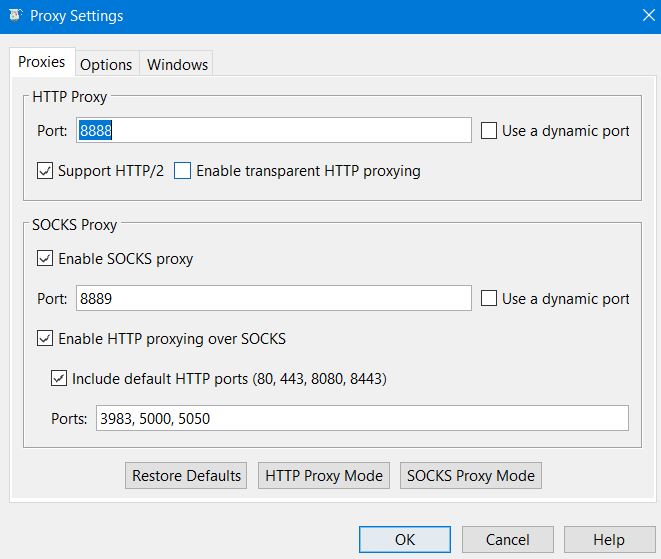
In Charles, open top bar: Proxy – Proxy Settings. Enable SOCKS proxy on port 8889. Enable http proxying over socks, include default ports. Then, in top bar: Tools – Map Remote, map a URL to your Server IP address:port, under http. The URL is: https://gc2018.gczero.com.

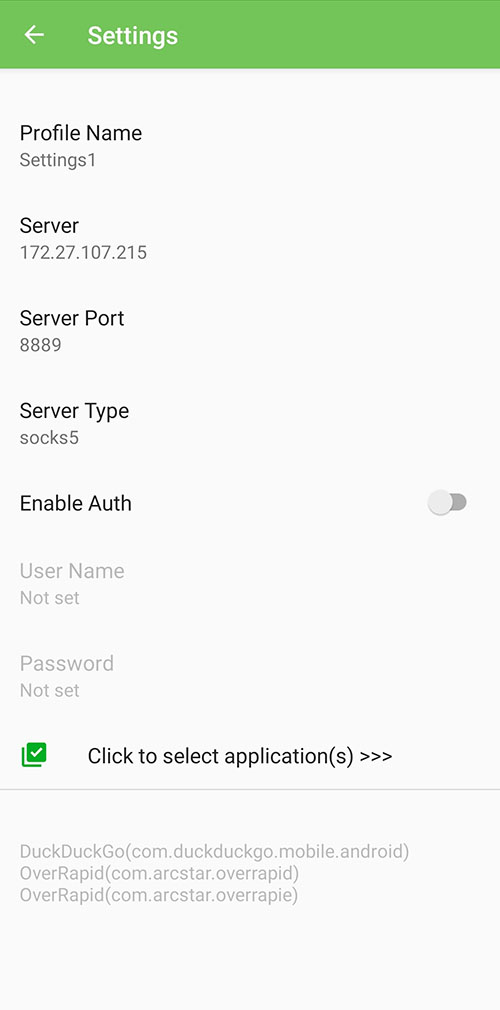
On your android device, open VProxid. Create a new profile, with the server being your computer’s IP, port 8889, type socks5, and select GROOVE 2 using the app selector. Once created, click the play button on the profile to activate it.
Make sure the private server is running on your PC. Make sure Charles acknowledges the connection from the device. Make sure VProxid is running. Make sure your phone and laptop are under the same network. Start the game, and ovserve the server.
iOS
I did not test this method on iOS. If you know how to proxy stuff there, feel free read the Android guide and try the equivalent on iOS.
Instruction for Use (For modified client)
Details
Android
Download the apk file from the link's install packages folder. Install it.
This apk has been modified. If you'd like to edit it on your own, see the last paragraph.
Open the game's obb with password eiprblFFv69R83J5, and extract all the files. Or, download the extracted folder from the link's install packages/main.76.jp.co.taito.groovecoasterzero.obb.
Open settings.cfg with your text editor, and change serverUrl to your server's http://ip:port/.
Use WinRAR or 7-zip to compress everything within the folder with the original password. Use ZIP legacy encryption for WinRAR, ZipCrypto for 7-zip。Name the compressed zip to main.76.jp.co.taito.groovecoasterzero.obb.
Paste (overwrite) the obb already inside Android/obb/jp.co.taito.groovecoasterzero. If the folder does not exist yet, you need to create it manually.
Open the game and observe the server output.
(The provided apk has the following modifications. Skip if you are not interested in it)
By modifying the apk's obb verification function and obb's settings.cfg, you can connect to the server without using any proxy software. To do so, decompile classes.dex using your favorite smali decompiler, and go to jp.co.taito.groovecoasterzero/BootActivity. Delete the part in e() where the loop is checking for a size, and, if mismatch, override a variable that causes the code to branch into DownloadActivity. We want the game to load the obb regardless of its size.
iOS
Download the ipa package from the link's install packages folder.
Open the ipa file with your favorite zip viewer。Go intoPayload,GROOVE 2. extract settings.cfg.
Open settings.cfg with a text editor,Edit serverUrl to your server's http://ip:port/.Dragsettings.cfg back into the ipa。
Sideload the ipa. Open the game, and observe the server.
Admin Functionalities
Database can be opened with DB Browser.
If you want to make your service only available to whitelisted devices, turn on AUTHORIZATION_NEEDED in config.py and add the device id after the .php request to the whitelist table. If you want to ban a device/taito ID, add the device ID or the username of the taito ID to the blacklist table. The reason column is for your own reference. If a device is logged in to that Taito ID, they cannot download asset, cannot log out, and cannot change name. If a device is not in the whitelist (if enabled) or is banned by device ID, they will not be able to download anything.
getCrypt.py is a standalone script used to decrypt the mass inside the GET requests.
Account System Implementation
Account is only used for save file saving/loading (song ownership and coins are tied to devices. However, songs unlocked in the save file will remain unlocked on a new device). Unlike the official version, you can rename and log out of your account. However, only one device may be connected to an account at a time. The old device will be logged off if a new device logs in.
Ranking System Implementation
I speculate that the official server's behavior hinges upon the fact that you cannot log out of your account, and that there is a maximum device count (5). This means that each account is connected to 5 devices via foreign keys, and the owned entitlements (stages, avatars, etc) and play records can be tallied.
In the private server, you can log out of devices with ease. This means that entitlements and play records is not possible to remain consistent, unless we treat account as devices, which is clearly not the offical behavior.
With the current setup, if a device is playing with an associated account, the account information is saved at the same time and will continue to be shown on ranking in the future. The Avatar information is saved with the play records and will not follow the account or device. The Title information is not in the play records, nor in the account, so it will be tied to the Title of the device.
中文
简介
此项目的目标是保持游戏的长远可用性 (game preservation)。在具体实施上,我采取了一些便利及创意性的措施(偷懒)。此项目的目标不是确保 1:1 还原官服,而是保证游戏长久可玩。此项目在MIT许可证的“按现状” (as-is) 条件下提供。
你不得将此项目用于商业行为。你应对因运行本服务器而产生的任何潜在后果承担全部责任。如果您不同意这些要求,则不允许您复制或运行该程序。
警告:不要将私人文件放至私服内的文件夹里。自带的文件夹内所有文件都可被私服抓取!安全性和效率无法保证,不建议在公网上搭建。这不是强制要求,不过别怪我没提醒过你。
支持的功能
| 功能 | 支持程度 |
|---|---|
| 文件下载 | .pak, 谱面及音频zip文件 |
| 商店 | 用GCoin购买单独的歌曲,头像,和道具。 GCoins可通过玩游戏来获得。不支持音频预览。不支持曲包。 |
| 排行榜 | 每首歌曲/难度的单独排行榜。总分排行榜。不支持地区排行榜。不支持查看其他玩家的详细信息。 |
| 存档备份 | 支持通过账号系统的保存/加载。支持修改密码和用户名。支持登出。 |
| Titles | 通过Status观看并使用全解锁的Titles。 |
| 任务 | 支持达到游戏内经验等级后歌曲自动解锁。其他功能均不支持。 |
| 好友 | 不支持。 |
| 进度表 | 不支持。 |
| 其他功能 | 账号/设备白名单和封禁。 |
下载
服务器下载:将此repo以zip形式下载。
资源下载:MEGA Baidu(密码aaaa)
如果你想将资源备份到别的网盘并贡献链接,请联系#AnTcfgss or QQ 3421587952,感谢!
下载 common.zip 和您设备的平台。将所有文件解压到服务器根目录。
环境依赖
-
Python
-
Flask
-
Crypto (pycryptodome)
-
Passlib
-
requests
如何开始
首先,你需要配置服务器。请使用配置服务器。
接下来,有两种方式来设置连接。选一个吧。
-
代理。需要更多配置,不过安装包不需要修改。
-
修改文件。配置更加简单,不过。。必须修改文件。
方法1,请使用原版安装包的使用说明。
方法2,请使用改版安装包的使用说明。
配置服务器
PC/MAC(简单)
按照下载章节来下载解压服务器和资源。
PC/MAC安装 python,安装 pip。
注意 MAC 默认为 python3。往后的示例默认用 windows 的默认,即 python。安装完成后,使用
pip install ...安装所有依赖项。
PC打开 cmd 输入 ipconfig。MAC 打开 terminal 输入 ifconfig。获得你的IPV4,一串为192或172开头的数字。
PC用文本编辑器打开服务器文件夹的 config.py,将IPV4填写至IP。PORT(端口)也可以更改。
文件管理器上方的文件夹路径清空,输入 cmd。命令行窗口会弹出。
输入 python 7001.py来开启服务器。如果出现错误,就解决他们吧。检查依赖项是否安装,网络配置是否正确。
安卓(稍难)
细节
安装 Termux.
输入下面的命令。
termux-setup-storage
pkg install python
用
pip install ...
来安装 flask, passlib, pycryptodome, requests.
如果出现ssl问题,可能需要pkg up ssl -y.
将服务器拷到手机上,或者在手机上解压服务器文件。(如不需要iOS文件,就省点手机空间,别拷贝ios的东西了)
修改 config.py 的 IP 至 127.0.0.1 (这是 本地回环。如果连接了WIFI,可以使用ifconfig 获取手机的 IPv4 并填入,以在整个网络下支持私服).
cd storage/shared/.... (服务器在安卓文件系统的位置)
python 7001.py 来运行服务器。
iOS (难)
细节
Pythonista貌似可用,不过我祝你好运。
原版安装包的使用说明
细节
安卓
对于 Android 9+ 设备,您需要绕过 https才能对游戏客户端和服务器之间的连接进行中间人攻击。如果您拥有 root 权限,则可以将证书安装到系统级别,从而允许设备信任中间人软件。若您没有root,此方法可能不可用。
这里展示VProxid加Charles方法。 在您的Android设备上安装VProxid。 在Windows PC上安装Charles。 Charles有免费试用期,但有多种方法可以免费注册。 请对此主题进行自己的研究。
你的服务器应该已经在运行。
在您的Android设备上安装Charles 根证书:Charles用户界面顶栏:Help – SSL Proxying – Install Charles Root Certificate on a mobile device. 按照其说明进行操作。Android设备上安装下载的证书。请按照此指南将用户级证书移至系统级。 完成后,转到系统设置 - 证书,仔细检查Charles证书是否出现在系统证书页面底部。
在Charles中,打开顶部栏:Proxy – Proxy Settings。 在端口8889上启用SOCKS代理。打开http proxying over socks,配置默认端口。然后,在顶部栏中: Tools – Map Remote,将如下URL映射到服务器IP:端口(http协议)。URL为:https://gc2018.gczero.com。
在您的Android设备上,打开VProxid。创建一个新的配置文件,服务器为您计算机的IP,端口为8889,类型为socks5,然后使用应用程序选择器选择GROOVE 2。 创建后,单击配置文件上的播放按钮将其激活。
确保您的PC上正在运行私服。 确保Charles提示并正在接收来自设备的连接。 确保VProxid正在运行。 确保您的设备和电脑在同一网络下。 开始游戏吧。
iOS
我不了解iOS系统,如果你了解ios的代理软件,可以阅读安卓部分,然后照葫芦画瓢(
改版安装包的使用说明
细节
安卓
下载网盘里install packages里的apk文件。安装。
此apk被修改过。若想自己修改,请看最后一段。
打开游戏的obb,密码是eiprblFFv69R83J5。提取全部文件。或者,从网盘下载install packages/main.76.jp.co.taito.groovecoasterzero.obb.
用文本编辑器打开settings.cfg,将serverUrl改成私服的http://ip:端口/。
用WinRAR或者7-zip压缩全部文件至zip,用密码加密。用ZIP legacy encryption/ZipCrypto。名称为main.76.jp.co.taito.groovecoasterzero.obb.
覆盖Android/obb/jp.co.taito.groovecoasterzero里的obb文件。如文件夹不存在,需要手动创建。
打开游戏,观察私服的输出。
(提供的apk已经执行了如下的修改,可以忽略)
你可以通过修改apk里的obb校验函数然后修改obb里的settings.cfg来直连私服,无需中继软件。用顺手的smali反编译器来反编译classes.dex,然后去jp.co.taito.groovecoasterzero/BootActivity。删除e()里循环检查文件大小的部分。这部分会检查obb文件的大小,如果不一致会修改一个变量跳至DownloadActivity。我们想强制游戏读取。
iOS
下载网盘里install packages里的ipa文件。
将ipa用压缩包软件打开。进Payload,GROOVE 2. 将settings.cfg提出。
文本编辑器打开settings.cfg,将serverUrl改成私服的http://ip:端口/。将settings.cfg拖回ipa。
侧载ipa即可。打开游戏,观察私服的输出。
管理员功能
数据库可以用DB Browser打开。
如果你想只对在白名单里的设备提供服务,开启config.py里的AUTHORIZATION_NEEDED,并将.php请求后面的设备ID加入whitelist列表。如果你想封禁设备或者Taito ID,将设备ID或者用户名加入blacklist列表。reason列可供你记录封禁原因。如果设备登陆该Taito ID,它将无法下载数据,不能登出,而且不能改名。如果设备在白名单开启后不在白名单里,或者设备被封禁,它将无法下载任何东西。
getCrypt.py 是一个用来单独解密GET请求后缀的脚本.
账号系统实装
账号仅用于保存/同步存档。Gcoin和歌曲所有权和设备绑定。不过,存档中已经解锁的曲目将在新的设备上可用。官方版不允许重命名及登出账号。私服则可以进行这些操作。不过,一个账号只能同时登陆一台设备,如果登录第二台设备,第一台设备将被挤掉。
排行榜系统实装
我推测官方服务器的行为取决于一个事实,即你不能注销你的账号,而且有一个最大设备数(5)。这意味着每个账户通过 foreign key 连接到 5 个设备,这样就可以统计所有拥有的 权益(音乐、头像等)和游玩记录。
在私服,用户可以任意注销设备。这意味着权益和游玩记录不可能保持一致,除非我们把账户当作设备,而这显然不是官服的行为。
目前的设置下,假如一台设备游玩时有关联账户,账户信息会同时保存,并且未来将持续显示当时连接的账户信息。头像信息随游玩记录保存,将不跟随账户或者设备。Title信息不在游玩记录里,也不在账户里,所以将和该设备的Title绑定。

File Structure 文件结构
server/
├─ files/
│ ├─ gc2/
│ │ ├─ audio/
│ │ │ ├─ ogg and m4a zips
│ │ ├─ stage/
│ │ │ ├─ zip files for stage
│ │ ├─ model.pak
│ │ ├─ skin.pak
│ │ ├─ tunefile.pak
│ ├─ web/
│ │ ├─ webpage assets
├─ 7001.py
├─ config.py
Journal
I've been forcing myself to document the process for personal project. So here goes.
English
Project Taiyo started on Feb. 19, 2024, as the effort to create a private server for Groove Coaster 2: Original Style. No prior effort was spent on the game, since the save file acquired from lp did unlock the majority of the track.
However, as updates slowed down and Groove Coaster 4max is scheduled to shut down, time were allocated to investigate the viability of a private server. Asset scraping was tedius as each song has multiple downloadable files, and there is no naming convention. Every zip file was acquired by hand(!) via manual downloading, which was soon proven unnecessary with the discovery of gcm-downloader.
The obb's decryption key was discovered in the android executable's lib file, and, during investigation of a config file within the obb, the server's address is directly editable. On the iOS, this config file is within the ipa. A proxy can be setup to mitm traffic for the same result. A simple server that handles asset delivery and static full-unlock profile was quickly developed.
An account system was developed that facilitates the save/load feature. The server request's GET field is encrypted, and, initially, the key and encryption method was not found. However, due to CBC encryption's flaw, part of the encrypted mess can still be used to identify users. Later, the key and IV to decrypt request was found in gcm-downloader, and used to implement a correct implementation of the server.
Besides the above features, all other functionality remains unimplemented. This was completed within a week (shorter than what is ideal, given project OverRide's priority). Some effort was spent on documenting the scraping, setup, and scripting, uploaded to a github repo, and the MVP is shelved.
In Janurary 2025, renewed effort was put on the project as Taito announced the cease of additional DLC, after a lackluster 2024 season. Groove Coin, a removed feature in-game, has been revived to facilitate a shop system. No longer is the server delivering static full-unlock save file, but the user can now acquire their own content in a balanced progression.
Additional effort was put on researching and REing various aspect of the game. 5 removed songs were re-enabled by lib editing, later via stage_param edit. Effort was spent on scripting a .pak unpacker and packer, which is successful and allow us to create own .pak files for delivery.
Effort was spent on the PC and Switch (waiwai) port, investigating the possiblilty of chart porting to Mobile. Switch version uses a significantly different system, charts lack critical elements and music is stored in header-removed opus. Porting from switch is deemed hard.
The PC version has exclusive songs/packs, and the chart/model files are an exact match from mobile asset. Music is in header-appended OGG, which is also compatible with Mobile. Porting is technically feasible if the format of stage_param can be RE'd.
On Jan. 24, 2025, Taito announced the end of service of the game. This prompted the creation of this repo and release of private server.